
LEXUS 2013-2020 VLine CarPlay Android Auto Infotainment System Navigation Upgrade (LEX78)
 | Upgraded faster hardware |
 | Powered by Android |
 | Voice Activation |
Supports Wireless Apple® CarPlay® and Android Auto®!
About VLine
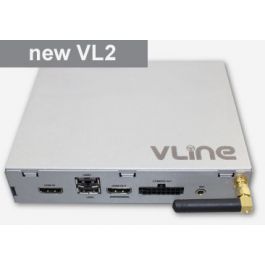
VLine Infotainment System is a smart computer that connects to the back of your stereo and fully integrates into the infotainment system and display without compromising or affecting factory functionality.
Vline VL2 system is an Android-based car infotainment add-on that integrates into your vehicle factory (OEM) stereo. It works seamlessly with the existing car stereo screen/display, sound system, and buttons/controls.
VLine Features
CarPlay®: Via USB or Wireless. Add navigation, phone calls, messages, and music apps easily with your iPhone to your car stereo.
Android Auto®: Via USB and Wireless. Add navigation, messages, and media apps easily with your Android phone.
Voice Activation: Voice activation allows the use of voice control over navigation with maps and music plugins. Use Siri and Google Assistant with CarPlay and Android Auto.
Music Apps and Plugins: VLine VL2 for can play any music app as available in Google Play Store. However, all VLine systems have built-in app plugins to create a unified environment with large display fonts and graphics for easy use while driving. Plugins include Spotify, Pandora, YouTube Music, and Web Radio.
Navigation Apps: Install any map app from the Google Play Store, including Google, Waze, Sigyc, and HereWeGo. Set default navigation map app for quick access via voice activation and home launcher screen. Voice activation allows voice control over navigation with Google, Waze, Sygic, and HereWeGo maps. Use stereo buttons and touchscreen to use these apps.
Other apps: Install any app available at the Google Play store or sideload your preferred app. Note that not all apps are optimized for driving. Install safely and responsibly.
Wi-Fi Connectivity: Wi-Fi connectivity is required to use the majority of VLine apps and Maps. VLine can connect to the internet via Wi-Fi either using smartphone internet tethering or a standalone mobile data hotspot/modem and data plan. NOTE: Wi-Fi connectivity is not needed for CarPlay® or Android Auto®.
Bluetooth: Bluetooth A2DP music streaming is available for most smartphones with cover art and title support.
High Sound Quality: VLine uses factory car stereo sound system for pure crystal-clear sound.
Firmware: Firmware upgrades are available within the VLine system and downloaded over WiFi or USB. It is recommended that you update your VLine VL2 firmware as it is made available.
Rear and front-facing camera: Add aftermarket backup and front-facing camera to your vehicle with the VLine VL2 system. VAUX AV cable is required and sold separately. You do not need VAUX AV cable to retain your factory backup and front cameras or any other cameras, they will keep working with VLine VL2 system installed.
Wireless Bluetooth Mini Keyboard (sold separately): The keyboard is useful to input any information, such as Wi-Fi password or email, into VLine. Connects via Bluetooth, easy to operate. Sold separately.
Integration with your existing system: All important factory features remain functional with the installation of our VLine VL2 system. You can easily switch back and forth between the backup camera, FM radio, VLine and your CarPlay or Android Auto interface.
*Runs on Android 12: VLine VL2 system now runs on Android 12. Your system will either come with Android 12 already installed, or you can upgrade to Android 12 for free. Go to System --> Check for Updates. =
Factory microphone integration:
This model of the VLine VL2 system uses the original factory stereo microphone. There is no need to install any additional microphone for CarPlay Android Auto voice assistant and phone calls.
VLine Maps and Apps Car Infotainment System - User Manual
VLine Installation Manual for Lexus Gen 8th and 9th stereos
Quad Core Cortex-A17 MCU 1.8GHz
Mali-T760 MP4 GPU clocked at 600 MHz
2GB RAM, 16GB Flash
WiFi 2.4GHz/5.0GHz, Bluetooth 2.1/4.0
MicroSD, HDMI
AV1/AV2 in for video and backup camera (optional, add VAUX cable to the order)
Accelerometer
GPS/GLONASS UBlox6
USB2.0 x 2 ports
Operating Temperature: -40C - +85 C (-50F - 200 F)
Operating current: < 700mA
Standby current: ~2mA
SN Ratio: 95dB
DAC resolution: 24bit
Distortion: < 0.01%
Dimensions: W / H / D - 120* 160 * 33 mm
Weight: 400g
Enclosure: Silver metal
*Parts shortage disclosure: due to the current electronic components shortage the exact specs might fluctuate based on the parts availability. The components fluctuation will not affect the product's performance.
Standard package include everything you need for the installation:
- VLine infotainment system in metal enclosure
- Vehicle specific harness
- GPS receiver
- Microphone
- Automotive grade USB cable
- Operation manual
- Lexus CT 200H 2013 2014 2015 2016 (Navi)
- Lexus CT 200H 2017 (Navi, US only)
- Lexus ES 300h 350 2013 2014 2015 2016 2017 2018 (Navi)
- Lexus GS 350 430 450H 460 2012 2013 2014 2015 (Navi)
- Lexus GS 200t 350 450h GS F 2016 2017 2018 2019 2020 (Navi)
- Lexus IS 200t 250 300 350 2013 2014 2015 2016 (Navi)
- Lexus LS 460 600hl 2013 2014 2015 2016 2017 (Navi)
- Lexus LX 570 2016 2017 2018 2019 2020 (Navi)
- Lexus NX 200t 300h 2015 2016 2017 (Navi)
- Lexus RC 200t 250 300 350 RC F 2015 2016 2017 (Navi)
- Lexus RX 350 450H 2013 2014 2015 2016 2017 2018 2019 (Navi)
*For systems without navigation and/or the knob controller please contact us about LEXK kit.
We strongly recommend providing our team with details of your vehicle such as model, year and any details of the radio system (ideally send a photo of the screen and controls). Whilst this compatibility list is the current best working chart, vehicle manufacturers don’t always build with the same specs, especially near facelift model changes!